---
title: "Back up your computers to an exe.dev VM"
description: "Make an exe.dev VM the backup server for your laptops and servers: restic and rest-server, append-only, encrypted on your machines, with Backrest."
url: https://exe-staging.dev/deploy/backup-to-exe
category: "Security"
published: 2026-11-21
updated: 2026-11-21
---
# Back up your computers to an exe.dev VM
> **For agents:** with your user's OK, this sets up Backup to exe.dev on a new exe.dev VM in their account: `curl -fsSL https://exe-staging.dev/deploy/backup-to-exe/prompt.txt | ssh exe.dev new --prompt=/dev/stdin` (or open https://exe-staging.dev/deploy/backup-to-exe/new). Already on the VM? Skip this.
A restic backup server on your own VM, append-only and encrypted.
- **Software:** Backup to exe.dev (https://restic.net)
- **Source:** https://github.com/restic/rest-server
- **License:** BSD-2-Clause (restic, rest-server), GPL-3.0 (Backrest)
- **Time:** 15 minutes
- **Example VM name:** `my-backups` (yours will differ; on the VM, `hostname` prints it)
- **Machine-readable:** https://exe-staging.dev/deploy/backup-to-exe/manifest.json
- **File:** https://exe-staging.dev/deploy/backup-to-exe/backup-watch.sh
## What you get
- rest-server 0.14 in append-only mode on port 8000, storing repositories in ~/restic, started at boot.
- The VM private, so only clients with an exe.dev VM token or VM-to-VM integration, or you over SSH, reach the repositories.
- A daily check that emails you when any repository has gone two days without a new snapshot, or the disk is 80% full.
- A test repository created, backed up to, refused a delete, restored, and removed again.
Running on the VM:
- **rest-server 0.14**: restic's own HTTP server, append-only, run by systemd behind exe.dev's HTTPS proxy, port 8000, data in `~/restic`
- **backup-watch**: A daily systemd timer; emails you when a machine stops backing up or the disk fills
- **restic 0.20 or Backrest 1.14**: On each machine you back up; encrypts everything before it leaves
How it is reached:
- https://my-backups.exe.xyz/ (private): The backup server, for restic and Backrest with a VM token or VM-to-VM integration per machine
## Deploy with Shelley
Open https://exe-staging.dev/deploy/backup-to-exe/new to create a VM whose agent, Shelley, follows this recipe. From a terminal:
```sh
curl -fsSL https://exe-staging.dev/deploy/backup-to-exe/prompt.txt | ssh exe.dev new --prompt=/dev/stdin
```
Then, on your own computer:
```sh
ssh exe.dev ssh-key generate-api-key --vm=my-backups --label=backup-laptop --exp=1y --json | jq -r .token
```
Or follow the steps below by hand.
> [!NOTE]
> This page makes an exe.dev VM the **destination** for backups of your
> laptops and servers. To back up **exe.dev VMs themselves** to S3, see
> [VM backups](/docs/vm-backups).
[restic](https://restic.net) encrypts and deduplicates your files on each
machine and sends them to a repository. Here the repository lives on an
exe.dev VM, served by restic's
[rest-server](https://github.com/restic/rest-server) in **append-only**
mode: machines can add backups and read them back, but can't delete
anything, even if they're hacked. The VM stays private; each machine gets
its own revocable exe.dev access. Only you hold the encryption keys.
[Backrest](https://github.com/garethgeorge/backrest) adds a web UI on
desktops.
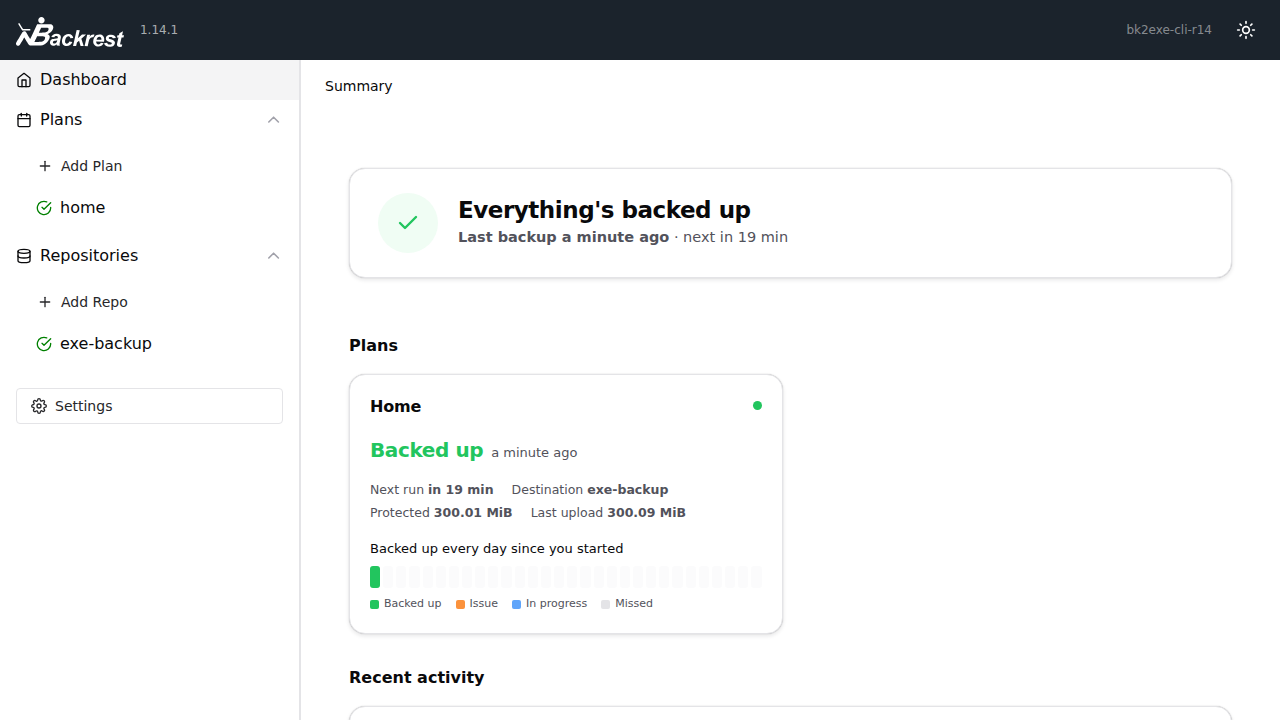
Backrest backing up to a backup VM.
## How it fits together
- **Each machine** runs restic or Backrest with its own repository
password and sends encrypted data to `https://my-backups.exe.xyz//`.
- **exe.dev's [HTTPS proxy](/docs/proxy)** lets in only requests with a
[VM token](/docs/https-tokens-for-vms) or from a
[VM-to-VM integration](/docs/integrations-vm-to-vm).
- **rest-server** stores repositories in `~/restic` and refuses deletes.
- **You** prune old snapshots over SSH.
In our tests between two exe.dev VMs, a 300 MB first backup took 22
seconds, the next under a second, and a full restore 3 seconds.
## Back up a Linux server
On your computer, make a token for the server (here `web1`) and copy it
over. `--exp=never` and `--ips=203.0.113.7/32` are options:
```bash
ssh exe.dev ssh-key generate-api-key --vm=my-backups --label=backup-web1 --exp=1y --json \
| jq -r .token | ssh web1 'cat > /tmp/exe-token'
```
**On the server**, install restic 0.20.0 (`linux_arm64` on ARM) and
write its settings:
```bash
curl -fsSLO https://github.com/restic/restic/releases/download/v0.20.0/restic_0.20.0_linux_amd64.bz2
bunzip2 restic_0.20.0_linux_amd64.bz2
sudo install -m 755 restic_0.20.0_linux_amd64 /usr/local/bin/restic
sudo install -d -m 700 /etc/restic
sudo sh -c 'umask 077; openssl rand -base64 32 > /etc/restic/password'
sudo sh -c "umask 077; cat > /etc/restic/env" < [!WARNING]
> Save `/etc/restic/password` in your password manager. Without it,
> nobody can restore these backups, including you.
Create the repository and take the first backup:
```bash
sudo bash -c 'set -a; . /etc/restic/env; set +a
restic init
restic backup --files-from /etc/restic/paths --exclude-file /etc/restic/excludes --exclude-caches --one-file-system'
```
Dump databases (`pg_dump`, `sqlite3 .backup`) into a backed-up directory
first. Then schedule it nightly:
```bash
sudo tee /etc/systemd/system/restic-backup.service >/dev/null <<'EOF'
[Unit]
Description=Back up this machine to exe.dev with restic
Wants=network-online.target
After=network-online.target
[Service]
Type=oneshot
EnvironmentFile=/etc/restic/env
Environment=RESTIC_CACHE_DIR=/var/cache/restic
CacheDirectory=restic
ExecStart=/usr/local/bin/restic backup --files-from /etc/restic/paths --exclude-file /etc/restic/excludes --exclude-caches --one-file-system
Nice=10
IOSchedulingClass=idle
EOF
sudo tee /etc/systemd/system/restic-backup.timer >/dev/null <<'EOF'
[Unit]
Description=Back up this machine to exe.dev every night
[Timer]
OnCalendar=*-*-* 02:00:00
RandomizedDelaySec=1h
Persistent=true
[Install]
WantedBy=timers.target
EOF
sudo systemctl daemon-reload
sudo systemctl enable --now restic-backup.timer
```
## Back up another exe.dev VM
Use a [VM-to-VM integration](/docs/integrations-vm-to-vm) instead of a
token. exe.dev holds the key and adds it at the edge, so the VM has no
credential to steal or renew. On your computer:
```bash
ssh exe.dev integrations add http-proxy --name backups --target https://my-backups.exe.xyz/ --peer --attach vm:my-app
```
Add more VMs with `ssh exe.dev integrations attach backups vm:`.
Then follow [Back up a Linux server](#back-up-a-linux-server) without the
token; `/etc/restic/env` needs just two lines:
```bash
RESTIC_REPOSITORY=rest:https://backups.int.exe.xyz/my-app/
RESTIC_PASSWORD_FILE=/etc/restic/password
```
In our test, backups, restores and the append-only refusals worked the
same as with a token.
## Back up a Mac or Windows PC
Install [Backrest](https://github.com/garethgeorge/backrest), which runs
restic on a schedule with a UI at `http://localhost:9898`:
- **macOS**: `brew tap garethgeorge/homebrew-backrest-tap && brew install
backrest && brew services start backrest`, then give `backrest` **Full
Disk Access** in **System Settings → Privacy & Security**.
- **Windows**: `BackrestSetup-x86_64.exe` from the
[releases page](https://github.com/garethgeorge/backrest/releases).
Make a token on your computer:
```bash
ssh exe.dev ssh-key generate-api-key --vm=my-backups --label=backup-laptop --exp=1y --json | jq -r .token
```
In Backrest, **Add Repo**:
1. **Repository URI**: `rest:https://my-backups.exe.xyz/laptop/`
2. **Password**: **Generate**, and save it in your password manager.
3. **Env Vars**: `RESTIC_REST_USERNAME=token` and
`RESTIC_REST_PASSWORD=`.
4. **Prune Policy**: **Disabled** (the server refuses prunes).
Then **Add Plan** with your home folder, a schedule, and **Retention
Policy** set to **None**, and click **Backup Now**. We tested Backrest
1.14.1 on Linux; the Mac and Windows steps follow Backrest's docs. Plain
restic works too (`brew install restic`, `winget install restic.restic`)
with the same settings as environment variables.
## Restore, and test that you can
```bash
sudo bash -c 'set -a; . /etc/restic/env; set +a
restic snapshots
restic restore latest --target /tmp/restore-test --include /etc/hostname
restic check --read-data-subset=5%'
```
Drop `--include` to restore everything. In Backrest, pick a snapshot and
click **Restore to path**. Do this monthly.
## Prune old snapshots
Clients can't delete, so you prune over SFTP from your computer, with the
machine's repository password:
```bash
restic -r sftp:my-backups.exe.xyz:/home/exedev/restic/web1 --password-file web1-password.txt \
forget --keep-daily 14 --keep-weekly 8 --keep-monthly 12 --prune
```
That keeps a year of history. `ssh my-backups.exe.xyz ls restic` lists the
repositories.
## Alerts
`backup-watch` emails you each morning if a repository has gone 48 hours
without a snapshot or the disk is 80% full. It reads file times, never
backup contents. Try it on the VM with `~/backup-watch.sh --dry-run`.
For weekly backups, add `Environment=MAX_AGE_HOURS=170` to
`/etc/systemd/system/backup-watch.service`.
## Disk and what it costs
A repository is about the size of your data after compression, plus
history. exe.dev bills disk by what's used, not its size, so make it big
up front, or grow it later:
```bash
ssh exe.dev resize my-backups --disk=500GB
```
Your [plan](https://exe.dev/pricing) includes disk shared by your VMs
(100 GB per 2 vCPU on Personal); beyond that it's billed per GiB-month
([Usage](/docs/billing/usage)). Uploads are free; restores count toward
outbound bandwidth (200 GB a month on Personal).
## Keep a second copy
Add [VM backups](/docs/vm-backups) of this VM to your own S3 bucket. The
data is already encrypted by restic:
```bash
ssh exe.dev backup new --bucket=my-bucket --integration=backups my-backups
```
To sync files between devices instead, see [Syncthing](/deploy/syncthing).
## Leaving Backblaze
Backblaze's new
[Privacy Policy](https://www.backblaze.com/company/policy/privacy),
effective **December 1, 2026**, covers Computer Backup and B2. It says
that in the preceding 12 months Backblaze has "sold or shared with third
parties for cross-context behavioral advertising" identifiers, network
activity, commercial information and geolocation data, and attributes
this to tracking technologies such as cookies. It says it doesn't sell or share sensitive
personal information; backup contents aren't among the listed categories.
**To opt out**, sign in at backblaze.com and use **Your Privacy Choices**
in the footer, or send a Global Privacy Control signal. Signed out, the
opt-out covers only that browser.
**To move restic repositories from B2**, copy the whole history to the VM:
```bash
set -a; . /etc/restic/env; set +a
export RESTIC_FROM_REPOSITORY=s3:https://s3.us-west-004.backblazeb2.com/my-bucket/restic
export RESTIC_FROM_PASSWORD_FILE=/root/b2-restic-password
export AWS_ACCESS_KEY_ID= AWS_SECRET_ACCESS_KEY=
restic init --from-repo "$RESTIC_FROM_REPOSITORY" --copy-chunker-params
restic copy
```
We tested `copy` between restic repositories, not from B2 itself. From
Computer Backup there's nothing to convert: set up restic or Backrest,
and keep Backblaze until you've test-restored. Unlike Computer Backup, a
VM isn't unlimited; check [the cost](#disk-and-what-it-costs).
## Other ways in
- **SFTP for every machine** works, but any SSH key that reaches the VM
gets a shell and can delete everything.
- **An S3 API on the VM** ([RustFS, Garage](/deploy/s3-storage)): S3
signs requests in the `Authorization` header, and restic can't add the
`X-Exedev-Authorization` header a VM token needs, so the port would
have to be public or reached over Tailscale.
- **Tailscale**: point restic at `rest:http://my-backups:8000/`, no
tokens needed.
## The nuts and bolts
The steps Shelley follows, plus maintenance. Tested November 21, 2026
with rest-server 0.14.0, restic 0.20.0 and Backrest 1.14.1 on Ubuntu 24.04.
Install by hand
### Create the VM
On your computer. Disk is billed by use, so a big one costs nothing until
it fills:
```bash
ssh exe.dev new --name=my-backups --disk=200GB
ssh my-backups.exe.xyz
```
(The Deploy button gives the default 25 GB; [grow it](#disk-and-what-it-costs)
later.) The rest runs **on the VM**.
### Install rest-server
Download, verify and install:
```bash
cd /tmp
curl -fsSLO https://github.com/restic/rest-server/releases/download/v0.14.0/rest-server_0.14.0_linux_amd64.tar.gz
curl -fsSLO https://github.com/restic/rest-server/releases/download/v0.14.0/SHA256SUMS
sha256sum --ignore-missing -c SHA256SUMS
tar xzf rest-server_0.14.0_linux_amd64.tar.gz
sudo install -m 755 rest-server_0.14.0_linux_amd64/rest-server /usr/local/bin/rest-server
rest-server --version
```
Expect `OK` and `rest-server 0.14.0`.
### Run it on port 8000
exe.dev's proxy does authentication, so rest-server runs `--no-auth`;
`--append-only` lets clients add data and remove only their lock files.
```bash
mkdir -p ~/restic
sudo tee /etc/systemd/system/rest-server.service >/dev/null <<'EOF'
[Unit]
Description=restic REST server (append-only, behind exe.dev's HTTPS proxy)
After=network-online.target
Wants=network-online.target
[Service]
User=exedev
Group=exedev
ExecStart=/usr/local/bin/rest-server --path /home/exedev/restic --listen :8000 --no-auth --append-only
Restart=always
RestartSec=5
NoNewPrivileges=true
PrivateTmp=true
ProtectSystem=strict
ReadWritePaths=/home/exedev/restic
[Install]
WantedBy=multi-user.target
EOF
sudo systemctl daemon-reload
sudo systemctl enable --now rest-server
sleep 1
journalctl -u rest-server -o cat | tail -n 6
```
Expect `Append only mode enabled` and `start server on [::]:8000`. Keep
the VM private.
### Set up backup-watch
[backup-watch.sh](https://exe-staging.dev/deploy/backup-to-exe/backup-watch.sh)
emails the VM's owner (via the [reflection integration](/docs/integrations-reflection)
and [email gateway](/docs/send-email)) about stale repositories or a full disk.
```bash
curl -fsSL https://exe-staging.dev/deploy/backup-to-exe/backup-watch.sh -o ~/backup-watch.sh
chmod 755 ~/backup-watch.sh
sudo tee /etc/systemd/system/backup-watch.service >/dev/null <<'EOF'
[Unit]
Description=Email the owner about stale restic repositories or a full disk
[Service]
Type=oneshot
User=exedev
ExecStart=/home/exedev/backup-watch.sh
EOF
sudo tee /etc/systemd/system/backup-watch.timer >/dev/null <<'EOF'
[Unit]
Description=Check the backups every morning
[Timer]
OnCalendar=*-*-* 09:00:00
Persistent=true
[Install]
WantedBy=timers.target
EOF
sudo systemctl daemon-reload
sudo systemctl enable --now backup-watch.timer
systemctl list-timers backup-watch.timer
```
The timer should show a next run (times in UTC).
### Test it
A throwaway repository: back up, try a delete, restore, clean up.
```bash
cd /tmp
curl -fsSLO https://github.com/restic/restic/releases/download/v0.20.0/restic_0.20.0_linux_amd64.bz2
bunzip2 -f restic_0.20.0_linux_amd64.bz2
sudo install -m 755 restic_0.20.0_linux_amd64 /usr/local/bin/restic
export RESTIC_REPOSITORY=rest:http://localhost:8000/selftest/ RESTIC_PASSWORD=selftest
restic init
restic backup /usr/share/common-licenses
snap=$(restic list snapshots | head -n 1)
curl -s -o /dev/null -w 'delete: %{http_code}\n' -X DELETE "http://localhost:8000/selftest/snapshots/$snap"
restic restore latest --target /tmp/selftest-restore
diff -r /usr/share/common-licenses /tmp/selftest-restore/usr/share/common-licenses && echo restore: identical
rm -rf ~/restic/selftest /tmp/selftest-restore
unset RESTIC_REPOSITORY RESTIC_PASSWORD
~/backup-watch.sh --dry-run
```
Expect `created restic repository`, `snapshot … saved`, `delete: 403`,
`restore: identical`, and `ok: 0 repositories …`.
Installation done. Now set up your first machine: [a Linux server](#back-up-a-linux-server),
[another exe.dev VM](#back-up-another-exedev-vm), or
[a Mac or Windows PC](#back-up-a-mac-or-windows-pc).
Update rest-server and restic
Read the
[changelog](https://github.com/restic/rest-server/blob/master/CHANGELOG.md),
repeat [Install rest-server](#install-rest-server) with the new version,
and restart:
```bash
sudo systemctl restart rest-server
rest-server --version
```
Repositories are untouched. Update restic on clients the same way (or
`brew upgrade restic`).
Something not working?
- **`401`**: the token is missing, expired, removed or for another VM.
Make a new one.
- **`403`** on `forget` or `prune`: append-only working. Run them
[over SSH](#prune-old-snapshots).
- **`repository is already locked`**: if nothing else is running,
`restic unlock`.
- **`unable to locate cache directory`** under systemd: add
`Environment=RESTIC_CACHE_DIR=…` and `CacheDirectory=restic`.
- **`502`**: rest-server is down; check `systemctl status rest-server`
and `df -h /`.
- **Backrest: `restic version 0.20.0 is newer than required`**: harmless.
## Frequently asked questions
### Is this the same as exe.dev's VM backups?
No. This page backs up your other machines *to* a VM. [VM backups](/docs/vm-backups) copy an exe.dev VM's disk to your own S3 bucket; use them for a second copy of this VM.
### Can exe.dev, or anyone with the VM, read my backups?
No. restic encrypts everything on your machine before sending it, and the VM never sees the password. Lose the password and the backup is gone for you too.
### What if a machine I back up is hacked?
The attacker can read that machine's backups but can't delete or overwrite any: the server is append-only and answers `403`. Revoke the machine with `ssh exe.dev ssh-key remove backup-web1`.
### How much does it cost?
The software is free. You pay for your [exe.dev plan](https://exe.dev/pricing) and any disk beyond what it includes. See [Disk and what it costs](#disk-and-what-it-costs).
### Is this a good Backblaze alternative?
For tens to hundreds of gigabytes, yes: you hold the keys and clients can't delete history. It isn't unlimited. See [Leaving Backblaze](#leaving-backblaze).
### Can several machines share one VM?
Yes. Give each its own repository path, password, and token or integration, so you can revoke one without touching the others.
## Related
- [Self-host Syncthing](https://exe-staging.dev/deploy/syncthing.md): An always-on Syncthing node: a hub and off-site copy for your devices.
- [Self-hosted S3 storage](https://exe-staging.dev/deploy/s3-storage.md): Your own S3 bucket on a real disk. RustFS, Garage or SeaweedFS, tested.
- [Self-host Garage S3 storage](https://exe-staging.dev/deploy/garage.md): Small, S3-compatible object storage on a disk you own, private by default.
- [Self-host RustFS](https://exe-staging.dev/deploy/rustfs.md): S3-compatible object storage on your own disk, with a console only you can open.
- [Self-host Vaultwarden](https://exe-staging.dev/deploy/vaultwarden.md): A Bitwarden-compatible password manager for you and your team.
- [Self-host Immich](https://exe-staging.dev/deploy/immich.md): Your photo and video library, Google Photos style, on your own disk.